Your documents, your way
Customer reference, delivery note, product code column or legal mentions, in a few clicks.
Odoo app · Community & Enterprise
Change your invoices, quotations and purchase orders without code. Add a field, a column, a text or a watermark, hide what you do not need, see the result on a real document.
€79 excl. VAT, one-timeOdoo 18 · 19 · 20
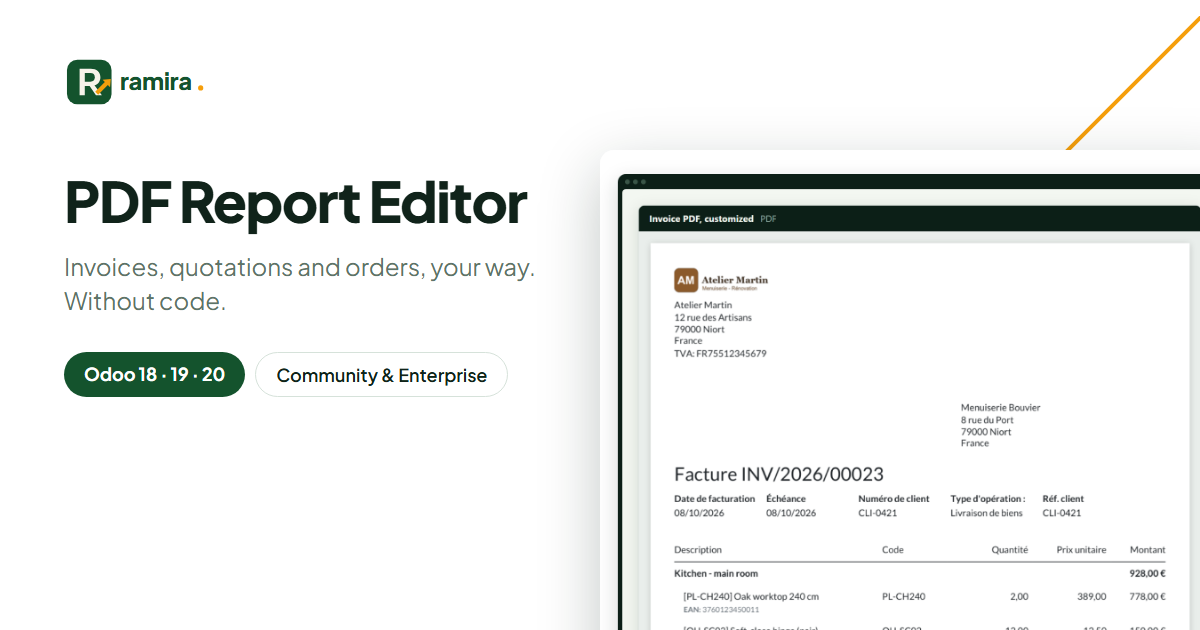
For whom: Odoo Community users who want documents in their own style without paying for Odoo Studio.
Customer reference, delivery note, product code column or legal mentions, in a few clicks.
Preview the PDF on one of your real invoices before anybody receives it.
Odoo’s own templates are never edited; a change is switched off in one click.
Export your customizations to a file and import them in the other database.
Before writing the app, we studied the competing apps on the Odoo store: their features, their prices and their customers’ reviews. Here is what sets it apart.
Field, column, text, detail: you add what is missing, instead of picking a ready-made template.
Compatible with other apps and Odoo updates.
Conditions and translations on each change, export and import between test and production databases.
Real screenshots of the app, taken on an Odoo demo database.
One customization per report, with its list of changes, to reorder, switch on or off.
Customer > Country > Code, Product > Internal Reference: the picker follows the links of your data.
A standard invoice after a few clicks: customer reference, product code column, added mentions.
Write your text and insert values between double braces, like the customer name or the date.
No. The app works on Community and Enterprise, without Odoo Studio.
Odoo keeps the PDF of a sent invoice. Changes appear on invoices printed afterwards.
On the official apps.odoo.com store, for Odoo 18, 19 and 20, Community and Enterprise, on Odoo.sh or on your own server. Odoo Online does not accept third-party apps. E-mail support included.
Describe it in a few lines: reply within 2 business days, with a first estimate.
Ramira measures its audience with Google Analytics, only if you accept. You can change your mind with the “Manage cookies” link at the bottom of the page. Learn more